
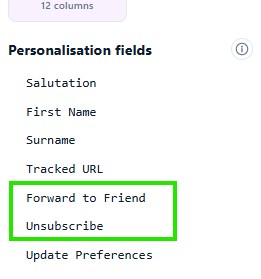
In the Personalisation Fields list in the left of the eNudge Campaign Editor, you will see ‘unsubscribe’ and ‘forward this email’ options. These are a special type of personalisation field to help promote these features in the body of your email.
Forward this Email
The forward personalisation field causes a link to ‘forward this email’ within the body of your email. Your contact can click on the link to navigate to a web form which makes it easy to forward your email individually to up to 4 of their friends. eNudge tracks the number of forwards achieved using this link, which helps you to understand engagement with your email campaign.
Every eNudge email includes the ‘Forward this Email’ option in the footer, but including the link inside the body of your email will bring feature this to people’s attention, in the context of your email content.
Unsubscribe
The unsubscribe personalisation field causes a link to the eNudge Unsubscribe feature for the individual contact to appear in the body of your email. If the contact clicks on the link eNudge can verify that they are a valid contact associated with your account, and then presents the contact with an unsubscribe facility to be removed from your future email campaigns.
Including an unsubscribe link in the body of your email may help to reduce complaints. Although, of course, every eNudge email includes an unsubscribe link in the footer, unless you are sending designated emails.