
You can personalise your eNudge email messages, so that each person receiving your email will automatically contain their information within the subject or body of the message… making it more engaging. People are much more interested in a message directly to them compared to a newsletter broadcast out to the world at large.
Personalising Email Content
To personalise the contents of your email using the eNudge drag and drop editor:
-
Click on a text or heading block in your email content, and place your cursor where you would like the personalised content to appear.
-
Find the required personalisation field from the list in the left of the screen, and click or drag the field into place.
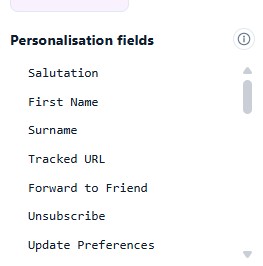
- The field code will then be inserted into your message e.g. #firstname#.
Similarly, you can personalise the content of your SMS messages.
Personalising your Email Subject
Place your cursor within your subject line where you would like the personalised information to appear.
Select the required field from the Subject Personalisation drop down menu.
Immediately that you click on a personalisation field, a code representing that piece of information will be added to your email subject.
Special personalisation fields include:
Forward to a Friend – inserts a ‘forward this email’ link within your email campaign which also allows you to track how many people received the forwarded message from each contact.
Unsubscribe – allows you to add the automated un-subscribe link into your email campaign.
Unlimited Personalisation
There’s no limit to the personalisation possible in eNudge. If you would like to personalise your message on information which is not part of the standard fields stored for each eNudge contact, you can do this using the ‘Upload Contacts into this Campaign’ method for attaching contacts to your campaign. Read more here.