
Some email newsletters can be lengthy and consist of multiple sections. In such instances, including a clickable Table of Contents at the top will:
-
help your readers get a quick overview of the content.
-
allow readers to click and jump to the sections they are most interested in.
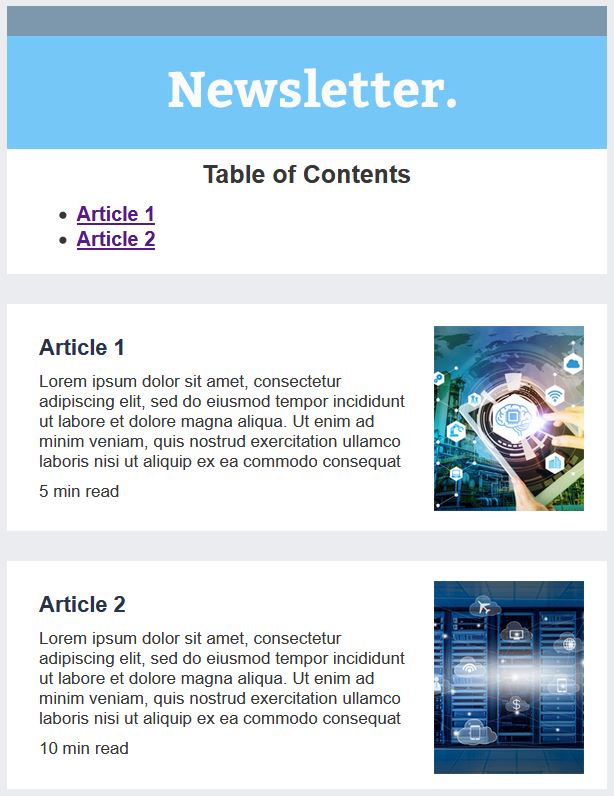
Below is a very simple example of an email with a table of contents at the top. Clicking the “Article 2” hyperlink under the Table of Contents will cause the view of the email to immediately scroll down to the section which contains Article 2.
Here is how you create a clickable Table of Contents in eNudge:
-
Create your email
Build your email in the eNudge email editor and include the text for your table of contents section.

-
Add anchor links
You then need to add anchors (points that a user can navigate to) throughout your email content. In our example, we would place an anchor to the left of the ‘Article 1’, heading in the first section, and to the left of the ‘Article 2’ heading in the second section of the email body.
To add an anchor, place your cursor where you would like the (invisible) anchor to be placed. You do that using the HTML widget. Drag that to just above where you want to link to, and then in the right hand panel add the code shown below, which is a simple a tag (or anchor tag) with both an ID and NAME property with the same value:
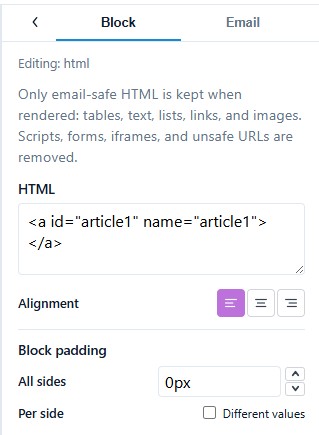
Including both the ID and NAME properties gives you the most email client support.
3. Link the anchor
Now that the anchor is in place, the text in your Table of Contents needs to be linked to it.
-
Select your link text (e.g. ‘Article 1’) within the Table of Contents.
-
Click on the Link icon in the text editing toolbar.
-
In the popup’s URL field, type ‘#’ followed immediately by the name of the link as shown below.
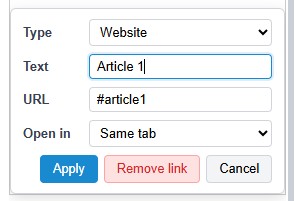
- Change the Open in value to ‘Same tab’.
-
Click Apply to complete the link.
4. Test
After saving your changes, use the Test Message feature to send yourself a test email, and ensure that all you table of contents links are taking you to the right place in the email.